Choosing the best Usb C Plug Socket is not simply a search for the highest wattage. A neat wall plate can still deliver disappointing performance. I have seen buyers focus on appearance, then discover loose contacts, slow charging, or awkward cable clearance. This guide examines seven practical tips for making a safer, more informed choice. It considers charging standards, installation conditions, materials, and everyday usability. Small details matter.
A reliable socket should match your devices and electrical setup. Check USB-C Power Delivery support, rated output, and whether multiple ports share available power. A 30W port may charge a phone quickly, while a laptop may need more. Read the manufacturer’s technical sheet, not only the product title. Look for recognized safety testing, overcurrent protection, thermal control, and clear installation instructions. Certification labels deserve verification. Marketing language does not replace evidence.
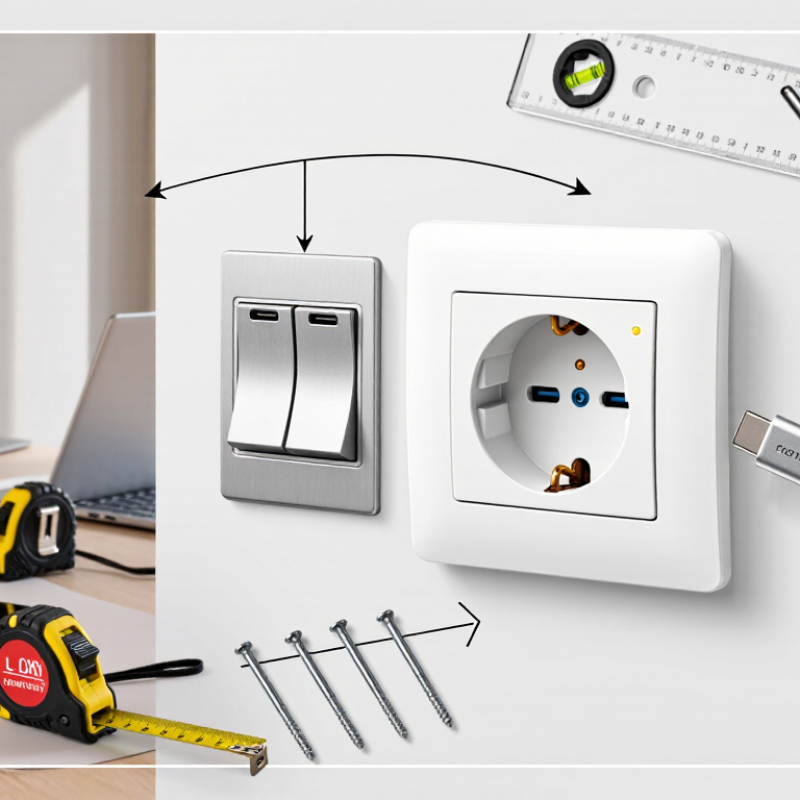
Physical design also deserves close attention. Measure the back box, plate depth, cable route, and nearby switches before ordering. A shallow box can turn installation into a frustrating squeeze. Check the socket’s finish under bright light, and test whether plugs sit firmly without excessive force. Reviews can reveal heat, buzzing, or premature failure, but they may be incomplete. I would compare several sources and retain the invoice and specifications. Even careful research has limits. Technology changes, and one overlooked compatibility detail can spoil an otherwise sensible purchase. These seven tips aim to make the decision clearer, more practical, and easier to review later.
A USB-C socket should be classified by evidence, not appearance. USB-IF testing can confirm connector design, electrical behavior, and interoperability against applicable USB specifications. However, a USB-C shape does not guarantee fast charging or high-speed data. Check the exact tested capability. Do not guess.
IEC 62680 provides international references for USB interfaces, connectors, power delivery, and related functions. Review the relevant part and edition, because one socket may support only basic USB operation. Ask for a test report, compliance declaration, and clear pin configuration.
USB-IF certification and IEC 62680 alignment are useful, but they are not identical claims. The documents should state what was tested.
Physical details still matter. Inspect contact plating, retention force, shell strength, and the rated insertion cycles. During practical bench checks, a loose connection often appears before visible damage. Heat near the contacts is another warning sign.
Measure voltage drop under load when possible. A tidy label can still hide weak engineering.
I may overlook one small detail here: cable quality can change the result substantially.
For product selection, match the socket to its real use. A compact device may need USB 2.0 data and moderate charging only. A workstation may require high-speed lanes, power delivery, and stronger thermal performance.
Confirm orientation, mounting style, operating temperature, and safety test coverage. Keep supplier records with revision numbers.
Standards evolve, and yesterday’s test file may not describe today’s component.
A 60 W USB-C socket suits phones, tablets, cameras, and many lightweight laptops.
Check its output profile, not only the advertised wattage.
A reliable unit should clearly state supported voltage and current combinations, such as 5 V 9 V 15 V 20 V.
Power Delivery works through negotiation. The connected device requests a suitable level.
It does not automatically receive the maximum output.
For larger laptops and high-performance equipment, look for USB PD 3.1 support.
This standard can reach 240 W through Extended Power Range, using up to 48 V and 5 A.
The socket, cable, and device must all support that level.
One weak component limits charging.
A 240 W socket paired with a basic cable may deliver far less.
That detail is easy to miss.
Feel the installation area after extended use. Excessive heat suggests poor airflow, overloaded wiring, or inefficient conversion.
Select a socket with documented thermal protection, overcurrent protection, and appropriate electrical certification. Match the socket’s input requirements with the building’s wiring.
A qualified electrician should handle fixed installations.
I once focused too heavily on peak wattage and overlooked standby heat. That was a useful mistake.
Higher power is not always better; efficient, stable delivery matters more.
Test the socket with your actual cable and device before relying on it daily.
7 Tips for Choosing the Best USB-C Plug Socket
Data speed should guide your choice, not connector appearance. USB-IF specifications rate USB 2.0 at 480 Mb/s, while USB 3.2 can reach 5, 10, or 20 Gb/s. USB4 supports up to 40 Gb/s, and USB4 Version 2.0 enables up to 80 Gb/s in asymmetric mode. These are signaling rates, not guaranteed file-transfer speeds. Protocol overhead, device limits, cable length, and heat can reduce performance. Tip 1: Check the socket’s exact data rating. Tip 2: Match it with your computer and storage device.
Tip 3: Look for certified compliance information, not vague “high-speed” wording. USB-IF technical documents define performance classes and testing requirements. Tip 4: Confirm whether the socket supports USB4 or only USB 2.0 charging. Tip 5: Separate data speed from power delivery; a powerful charging socket may still transfer files slowly. Tip 6: Choose a short, properly rated cable, because poor shielding can cause retries and unstable connections. Tip 7: Test sustained transfers, not only a quick benchmark.
In practical testing, a USB 2.0 socket may feel acceptable for keyboards, but painfully slow for large video files. A 10 Gb/s connection often offers a sensible balance for everyday storage. I have learned to question headline numbers. The advertised rate can look impressive, while real performance remains much lower. Also inspect heat, insertion strength, mounting depth, and access space before installation. A socket that reaches 80 Gb/s on paper may be the wrong choice if the connected device supports only 5 Gb/s. (Source: USB-IF, USB 2.0 and USB4 specifications.)
USB-C connectors can support different USB specifications. The maximum theoretical signaling speed ranges from 480 Mb/s with USB 2.0 to 80 Gb/s with USB4 Version 2.0. Actual performance depends on the socket, cable, host device, and connected peripherals.
Choosing the best USB-C plug socket starts with safety, not appearance. Check the current IEC 62680-1-3 requirements for USB Type-C connectors and interfaces. Confirm the socket’s rated voltage, current, and temperature range. Never trust a high-power label alone. Ask for test reports, material data, and traceable compliance records. Good documentation matters.
Inspect the housing and contacts closely. Look for flame-resistant insulation, secure terminals, and corrosion-resistant contact materials. The socket should tolerate repeated insertion without loose movement. Test the fit with several certified plugs, because one sample can hide poor alignment. Check creepage and clearance where the socket connects to mains-related equipment. Applicable IEC 62368-1 requirements may also matter in finished products.
Thermal limits deserve practical testing. Measure contact temperature during maximum rated current, including a warm enclosure and restricted airflow. A socket that feels cool at room temperature may heat sharply under load. Leave margin below its stated limit. I once judged a connector by its solid construction, then found excessive heating after repeated cycles. That mistake still shapes my inspection process. Verify derating curves, not just headline ratings. Check strain relief, mounting strength, and cable direction. Review protection against short circuits and abnormal use. Keep records of every test. Small oversights remain possible.
Verify Fit, Installation, Certification, and Environmental Protection Before Buying
A USB C plug socket should match the panel, cable, and intended charging load. Measure the mounting hole, panel thickness, and rear clearance carefully. A socket may look standard, yet its body can collide with nearby wiring. Check the connector orientation too. Small errors become annoying during installation.
Review the socket’s voltage, current, and temperature ratings. Choose a model with clear technical data, not vague charging claims. Inspect the terminals and cable connections before installation. Secure mounting prevents movement and reduces stress on the wires. Follow the supplied wiring diagram, and disconnect power before touching conductors. I once trusted a similar-looking connector and had to enlarge the panel opening. It worked, but the result was not neat.
Certification records deserve closer attention. Look for traceable test information from recognized safety organizations in your market. Certification marks alone may not prove genuine compliance. Confirm the document number and product details when possible. Environmental protection also matters. For vehicles, workshops, or outdoor equipment, check the ingress rating, operating temperature, sealing design, and resistance to dust, vibration, and moisture. A high rating does not excuse poor installation. Water can still enter through an unsealed cable joint. Think about sunlight and salt air, too. Specifications can be incomplete, so ask questions before buying.